Get started
Webhook
Receive parsing results automatically in your application.
Webhook lets Mataparser send parsing results directly to your endpoint. You can configure a webhook after creating an API key, and each API key can have its own webhook URL.
Features
- Get asynchronous parse result delivery to your backend
- Configure webhook per API key for better environment isolation
- Receive status, extracted text, and structured JSON in one payload
Setup
Create an API key first from https://mataparser.cloud/app/api-keys. After that, set a webhook URL on that API key. The webhook URL should point to your backend endpoint.
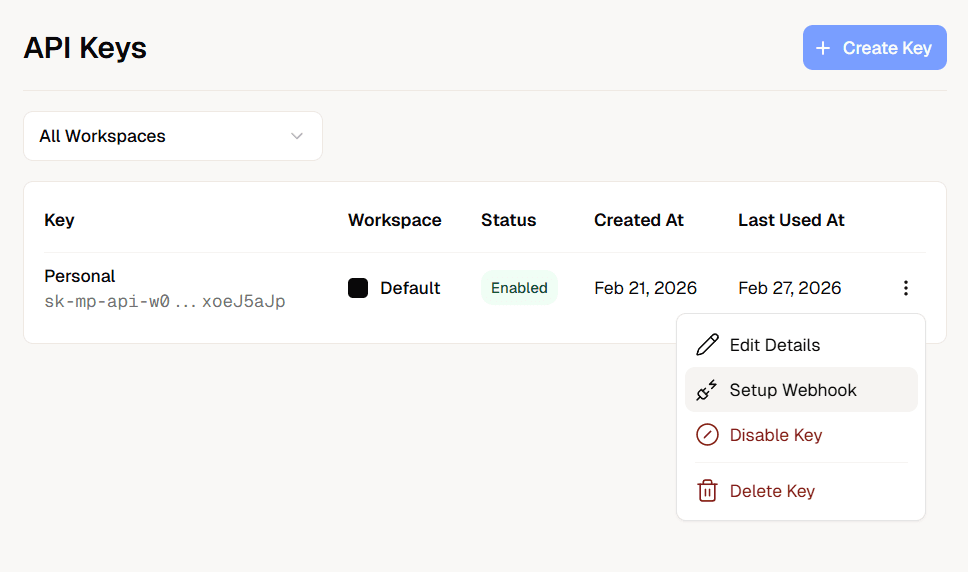
Click the "Setup Webhook" menu and you will see a form to input your webhook URL.
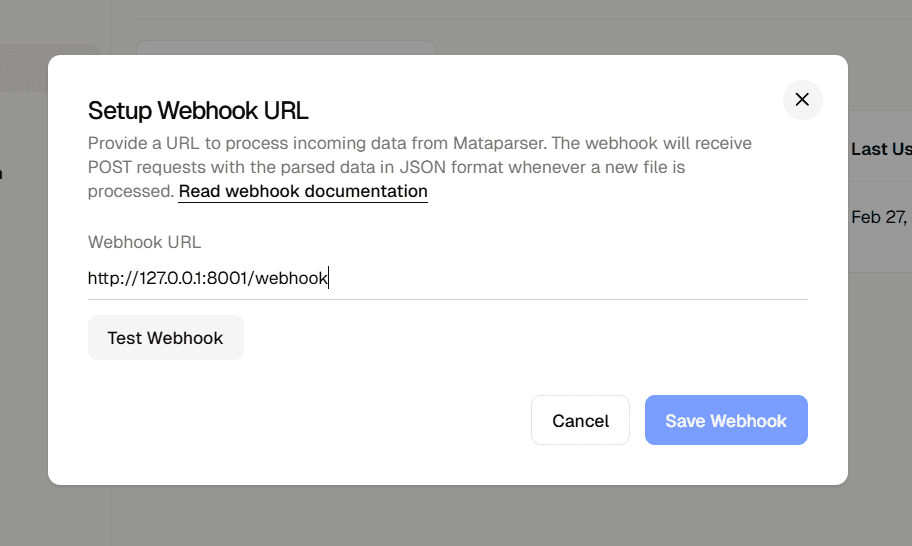
Click "Test Webhook" to send a test payload to your endpoint and make sure everything is working.
Webhook URL example:
Webhook Payload
Mataparser will send a payload like below to your webhook endpoint:
- object_id: Parsed object identifier
- status_code: Parsing status for that request
- json_result: Structured extraction output
- error: Error message when parsing fails
Endpoint Handler Example
Handle webhook requests in your backend and return HTTP 200 once processed.